n8n logo
Zapier logo
Claude logo
HubSpot logo
Make logo
Nova logo
Puzzle vs Mermaid

Your operations deserve more than a block of code

Mermaid is built for diagrams as code. Puzzle is built to help you understand your operating model to assist in making your biggest operational decisions.

The difference

Puzzle is your operating model.

Mermaid is a basic map.
Puzzle logo
A decision-grade blueprint of your operation
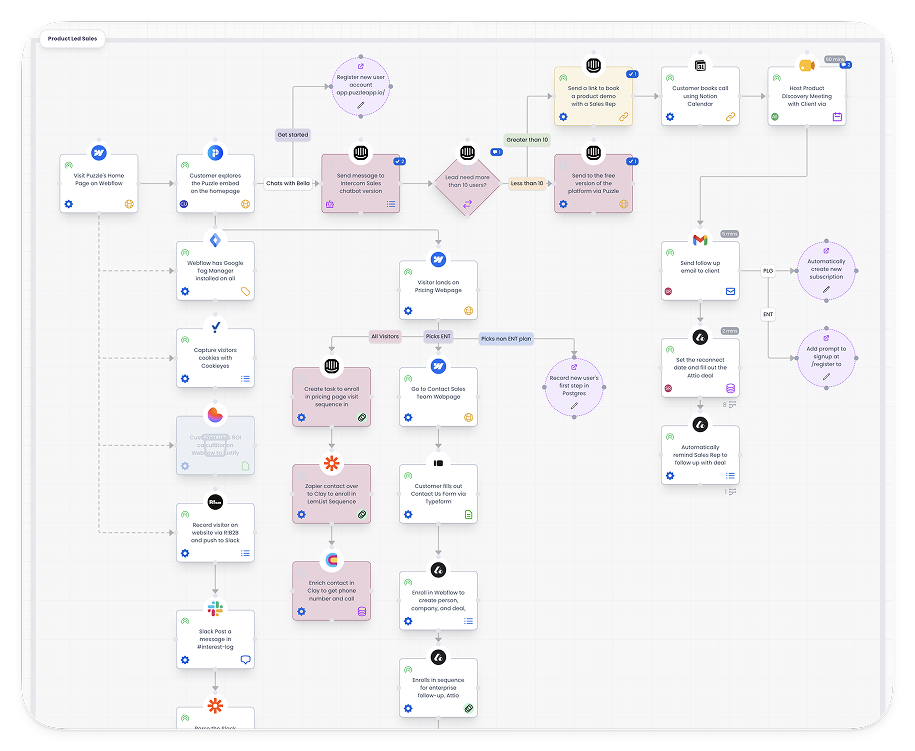
Puzzle workflow map with connected roles, tools, and costs
Understand your operating model
See what breaks before you change a tool or a role
Recall why things work the way they do
Give AI agents the full picture over MCP
Diagrams as code, rendered anywhere
Competitor board with free-form boxes, lines, and stickies
Write a diagram in plain text, render it anywhere
Lives in git, next to your code and docs
The syntax draws a picture, with nothing underneath
Moving a box means editing code
Side by side

Compared by outcome

Mermaid is excellent at quick diagrams in docs and repos. But this comparison is about a different job: understanding and improving how your operation runs.

The outcome
Puzzle
Mermaid
Understand your operating model
Puzzle
Four connected canvases, one system
Mermaid
Rendered text, no model
Spot process inefficiencies
Puzzle
Costs and owners on every step
Mermaid
Eyeball the render
Consolidate the tech stack
Puzzle
See every workflow a tool touches
Mermaid
Tools live in node labels
Debug an automation
Puzzle
Trace the flow to the step (and data)
Mermaid
The code describes it, nothing traces it
Recall why a decision was made
Puzzle
Changelog linked to the blueprint
Mermaid
Git blame, not decisions
Compare current process to future state
Puzzle
Structured states built from the same objects
Mermaid
Two code blocks drift apart
Cost labor and ROI of a change
Puzzle
Time and rates roll up per process
Mermaid
Nothing to add up
Evaluate a new tool before adopting it
Puzzle
See integration points clear as day
Mermaid
Rewrite the code and guess
Scope the blast radius of a change
Puzzle
Every step, role, and tool it affects
Mermaid
Grep the repo and hope
Equip AI agents with your operations
Puzzle
Agents query the blueprint over MCP
Mermaid
LLMs draw it, can't query it
Plan your AI transformation
Puzzle
See where AI runs today and where it could run next
Mermaid
A diagram, not a roadmap
Onboard people into how work runs
Puzzle
One shared, current picture
Mermaid
A README with a picture
Survive a key person leaving
Puzzle
Instant knowledge transfer
Mermaid
The code only makes sense to them

The takeaway

Every big operational decision is only as good as the context behind it.

A quick map gives you hunches. A connected blueprint gives you context you can act on.

FAQ

Frequently asked questions

Is Puzzle a replacement for Mermaid?
For operational documentation, yes. For quick diagrams inside repos and docs, keep Mermaid. Plenty of teams run both: sketch in Mermaid, then document the real operation in Puzzle.
We already keep Mermaid diagrams in our docs. What would change?
Your diagrams become structured objects instead of rendered text. Workflows, teams, tools, and data link together, so when something changes you update it once and every connected step reflects it.
Can AI still generate our diagrams?
Yes. Nova drafts workflows from docs, transcripts, and screenshots, and the result is a connected model your team can keep current, query, and cost.
How does the blueprint stay accurate over time?
Your team runs changes through the changelog. Decisions get logged against the parts of the blueprint they touch, so the picture stays close to reality and you can see how it evolved.

Trusted by system builders

★★★★★

“Absolutely love Puzzle's ability to be an impossible tool to work without. If you're a visual systems person who needs every step in each workflow and project mapped out, you have to give Puzzle a chance. You won't regret it.”

See more

Kelvin Ngo
Kelvin Ngo
Senior Client Success Manager, CloudTask
★★★★★

“Puzzle became our go-to tool whenever we need to map out our processes. We completely stopped using Whimsical, Miro, and Figma.”

See more
Alex Vacca
Alex Vacca
COO, ColdIQ
★★★★★

“I was looking for a bird's eye view, a top level view of how all of my processes are connected. I found Puzzle, and this is the tool I've been looking for. That's when the light clicked for me.”

See more
Chris Davis
Chris Davis
Founder, Automation Bridge
★★★★★

“I knew I would never again use Lucidchart, Whimsical, or Miro for mapping processes. It was like finally having shoes that fit. It helps us show clients what we are building for them, and we easily identify gaps before implementation.”

See more

Kronda Adair
Kronda Adair
Founder, Karvel Digital
★★★★★

“We tried every visual workflow software out there, from Lucidchart to Whimsical to Miro, and ultimately went with Puzzle. Their support is bar none the best. You'll know you're always in good hands.”

See more

Jordan Armstrong
Jordan Armstrong
CEO, Impact Ops
★★★★★

“Puzzle is next level. I work in systems and automation and Puzzle brings so much clarity to not only my clients' businesses but my own as well. Anyone wanting systems clarity needs to try Puzzle.”

See more
Sam Pryke
Sam Pryke
Founder, Ops Digital

See your operation as a system.

Map your first workflow today. Free to start, no credit card needed.